
.png)
No two venues operate the same way. A high-volume nightclub has very different needs than a retail store, logistics hub, or ticketed event. Thus, when choosing an ID scanning solution, it is best to consider hardware flexibility.
Patronscan systems are designed to adapt to your environment, staffing model, and traffic flow. Whether you need fast, mobile scanning or a rugged, fixed installation for forensic-level validation, Patronscan hardware scales with your operation.
This guide breaks down the two core hardware options; Handheld Units and Kiosk Style Units and explains how to choose the right setup for your venue.
Why Hardware Flexibility Matters for ID Scanning
Businesses and venues have a wide variety of needs when it comes to ID scanning equipment, and forcing the wrong solution can not only have an impact on the effectiveness of the system itself, but it can also have an impact on your workflows, efficiency, and overall guest or client experience. Some key factors in determining the right hardware selection for your business include:
- Variable crowd sizes and overall volume of guests
- Multiple entry points or single access
- Seasonal temperature changes
- Temporary vs permanent installations
- Staff turnover and training needs
- Durability of system and components
A one-size-fits-all solutions can create friction, and compromises that undermine the overall effectiveness of your investment. A flexible hardware ecosystem, on the other hand, allows operators to:
- Select a solution that matches an existing traffic or guest flow
- Maintain fast entry during peak hours
- Add or remove scanning points as needed
- Support compliance, security, and guest experience simultaneously
- Future-proof their investment as operations evolve
Patronscan hardware is built with this reality in mind, and a key reason why Patronscan is the industry leader in innovate solutions with flexible hardware and software solutions.
Handheld ID Scanner Units
Fast, Mobile, and Built for Throughput
Handheld units are the most versatile devices in the Patronscan hardware line-up, and are popular choices for many existing clients. Designed for speed and mobility, they’re ideal for environments where flexibility and efficient traffic matter.
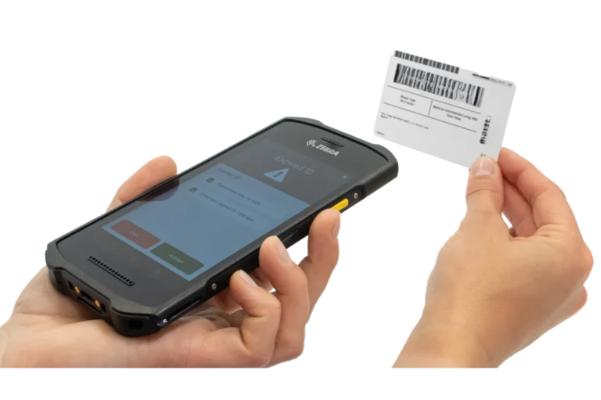
Best Use Cases for Handheld Units
- Smaller operations and venues
- Secondary or overflow entrances
- VIP lines and guestlist check-in
- Event and festival access points
- Temporary or pop-up venues
Key Advantages
- Fast entry flow – Optimized for quick scans without slowing the line
- Portable and lightweight – Easy to redeploy as traffic shifts
- Ideal for events – Perfect for short-term setups and mobile teams
- Scales easily – Add devices instantly for busy nights or special events
Handheld scanners are often the first choice for operators who need speed, adaptability, and minimal footprint, without sacrificing accuracy or compliance.
Kiosk ID Scanner Units
Rugged, Forensic-Grade, and Built for Primary Entry
Kiosk units are designed for venues that require maximum durability, precision, and consistency. These scanners are typically used at fixed locations and are ideal for primary entry points where every ID matters.
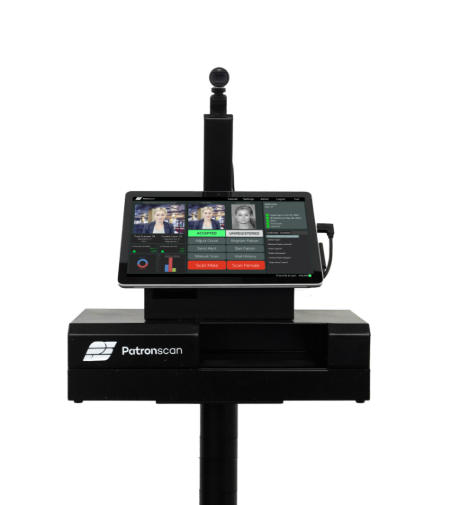
Best Use Cases for Kiosk Units
- Main front-door entrances
- Logistics or employee access points
- Stationary security desks
- Retail and age-gated product access
- Environments requiring forensic-level ID analysis
Key Advantages
- Forensic scanning capability – Enhanced validation for higher-risk environments
- Rugged construction – Built for long-term use and temperature variation
- Flexible installation – Available with or without stands
- Consistent operation – Ideal for standardized entry procedures
Kiosk units are often chosen by operators who want a fixed, authoritative checkpoint - one that delivers consistency, compliance, and confidence shift after shift.
Combining Hardware for a Smarter Setup
Many Patronscan clients don’t choose one or the other; they use both.
A common configuration includes:
- Kiosk units at the primary entrance for forensic scanning and compliance
- Handheld units for secondary doors, VIP lines, or peak-hour overflow
This hybrid approach gives venues the best of both worlds: structure where it matters most and flexibility where it’s needed.
Designed to Grow With Your Operation
One of the biggest advantages of Patronscan hardware is that it doesn’t lock you into a single configuration. As your venue grows, changes layout, or expands to new locations, your hardware setup can evolve with it.
From a single handheld scanner to a multi-location deployment with kiosks and mobile units, Patronscan supports:
- Bars and nightclubs
- Retail and age-gated sales
- Automotive Dealerships
- Events and festivals
- Logistics and access-controlled environments
Choosing the Right Patronscan Hardware
The right hardware depends on:
- Entry volume and traffic patterns
- Whether the setup is permanent or temporary
- Environmental conditions
- Compliance and risk requirements
- Staffing and operational workflows
Patronscan works with operators to assess these factors and recommend a configuration that fits not just today, but long term.
Designed to Work Right Out of the Box
One of the most overlooked factors when selecting an ID scanner is what’s actually required to make it operational on day one.
Patronscan systems are designed as complete, self-contained solutions. The hardware includes everything required to scan IDs, process data, and operate independently without relying on external computers, tablets, or third-party devices.
The Hidden Reality of “No Extra Hardware Required”
Some ID scanning providers advertise that their systems don’t require additional equipment. In practice, many of these solutions still depend on:
- A connected PC or laptop
- External tablets or consumer-grade devices
- Permanent power and data connections
- Additional mounts, cables, or adapters
These dependencies can introduce, complexity, increase failure points, and often create higher long-term costs, even if the upfront price appears lower. When evaluating an ID scanner, it’s important to ask:
- Does the device operate out of the box?
- What happens if the connected PC or tablet fails?
- Who is responsible for sourcing, securing, and maintaining those extra components?
Hardware Placement, Protection, and Cabling Considerations
ID scanners live at the front line of your operation. Placement and protection are not afterthoughts; they directly impact reliability, staff efficiency, and guest experience.
Placement Matters
Consider where the device will live:
- Primary entrance vs secondary access
- Indoor vs semi-outdoor environments
- Fixed desk, wall mounted, or free-standing installation
- High-traffic areas where spills, bumps, or tampering may occur
Patronscan kiosk units are designed to be stationary, durable, and adaptable, with options for stands or fixed mounting, as well as wall mounted units. Handheld units offer mobility without sacrificing reliability, allowing operators to adjust placement as traffic patterns change.
Protecting Your Equipment
Consumer-grade devices connected to scanners are often:
- Easier to damage
- More attractive targets for theft
- Harder to secure in busy environments
Purpose-built Patronscan hardware reduces these risks by minimizing exposed components and eliminating the need for loosely mounted external devices.
Managing Cabling and Connections
Cabling is one of the most common failure points in ID scanning setups:
- Loose or exposed cables can be damaged or disconnected
- Long cable runs increase installation complexity
- Additional devices mean more points of failure
By operating as standalone systems, Patronscan devices simplify cabling requirements and reduce ongoing maintenance.
Think Beyond Price: Total Cost of Hardware Ownership
The listed price of an ID scanner rarely tells the full story. When comparing solutions, factor in:
- Additional computers, tablets, or peripherals
- Mounts, stands, and enclosures
- Installation time and labor
- Maintenance and replacement costs
- Downtime caused by hardware failures
- Long-term scalability across multiple locations
A lower upfront price can quickly be outweighed by operational friction and hidden costs.
Patronscan hardware is designed to reduce total cost of ownership, not just initial purchase price by delivering durability, independence, and operational simplicity from day one.
Final Takeaway for Buyers
When selecting an ID scanning system, don’t just ask: “How much does it cost?”
Ask:
- Does the hardware I’m purchasing fit my intended guest and operational flow, and overall need?
- What do I need to be operational on day one?
- How complex is the setup?
- How well will this hardware hold up in my environment?
- What will this system cost me over three to five years?
Hardware versatility, independence, and thoughtful design are what separate a short-term fix from a long-term solution.
Give us a call, or request a free demo, to ask these questions to our team and hear the answers that we have for you.
.png?width=352&name=Blog%20Image%20Size%20(31).png)
.png?width=352&name=Blog%20Image%20Size%20(55).png)
.png?width=352&name=Blog%20Image%20Size%20(42).png)